How It Works
Up and running in under
30 minutes.
Three steps. No technical setup. No training required. Your staff will get it on the first shift.

Set up your restaurant
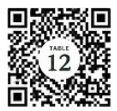
Add your tables, generate a unique QR code for each one, and print them out. The whole setup takes under 30 minutes.
- Upload logo (optional)
- Select number of tables
- QR codes are generated & numbered automatically — no design work needed
- Print and display on table or put in the menu
Customers scan and request
Guests scan the QR code at their table. A simple page opens in their browser — no app, no account. They tap what they need and it's done.
- Works on any smartphone — iOS, Android, anything with a camera
- Page loads in under 2 seconds on any connection
- Common requests are one tap: Need server, need refill / drink, ready to order, ready for check, request manager
- Guests no longer have to wait impatiently, while servers are unaware that they are looking for service.

Staff respond in real time
The request appears instantly on the staff dashboard. Servers see the table number, what was requested, and how long it's been waiting. One tap to mark it done.
- Requests are color-coded: green (new), orange (waiting), red (overdue)
- Every server sees every open request — no one misses a table
- Mark complete in one tap — the table status updates for everyone
- Customers are not kept waiting and have a better experience
- Managers can see the full floor at a glance from their dashboard

The result?
Guests get what they need without flagging anyone down. Staff stop running blind. Managers stop putting out fires. And your reviews start reflecting the service you actually deliver.
Tables turn quicker, leading to less wait time for customers waiting to be seated and more profit for the restaurant. Faster service equals better reviews & better tips.
Reducing guest wait times doesn't just improve service—it creates opportunities to serve more guests. For a busy 50-table restaurant, seating just 12 additional parties on Friday and Saturday nights could represent more than $112,000 in additional annual revenue.
What your team will ask
Do we need Wi-Fi at every table?
Guests use their own phone data or your restaurant's Wi-Fi. The page is lightweight — it loads even on a weak signal.
What if a guest doesn't have a cell phone?
They continue to order as they have always done. Right On It is a convenient way to let your server know that you need something, eliminating long wait times and frustration.
Will staff actually use it?
Yes — because it makes their job easier. No more guessing which table is waiting. The dashboard tells them exactly where to go.
How long does setup take?
Most restaurants are fully set up in under 30 minutes. Add tables, print QR codes, add shift managers — done.
Ready to run a tighter floor?
30 day free trial. Cancel any time.